📊 Visual Aids & Technology · Lesson 7 of 8
Avoiding Death by PowerPoint
Death by PowerPoint is the systematic destruction of audience attention by misusing presentation software. It has become the dominant mode of presenting in professional settings — which means avoiding it is a significant competitive advantage.
💀
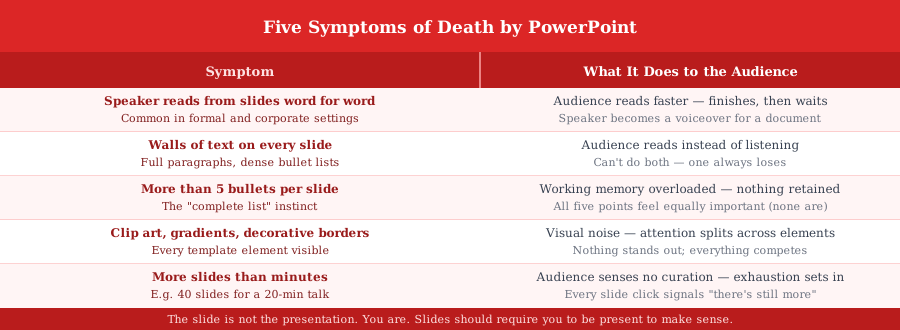
Five Symptoms of Death by PowerPoint
The diagram lists all five symptoms and what each one does to the audience. Any one of them is enough to lose the room. Most corporate presentations have all five.
💡 Tip: Ask yourself: 'If I sent these slides by email, would the audience get the same value?' If yes, you have not built a presentation — you have built a document in slide format. Send the document. Build a presentation.
🎯
Worked Example: Before and After
Topic: 'Why most professionals will never use AI effectively.' The same content — one version kills the audience, one version serves them.
Death by PowerPoint version vs Fixed version — same content: ✗ DEATH BY POWERPOINT VERSION:
40 slides for a 20-minute talk. Every slide has 6 bullets. Opening slide: title, logo, date, 'Confidential', department name, speaker photo. Slide 3: 'Agenda — 1. Introduction 2. Background 3. Context 4. Data 5. Analysis 6. Conclusions 7. Next Steps 8. Q&A.'
Speaker reads every bullet aloud. Audience reads ahead. Room loses attention by minute 4.
——
✓ FIXED VERSION:
12 slides for 20 minutes. Slide 1: one number — '12%' — in large text. Speaker opens: 'That is the percentage who use AI effectively. I am going to show you why — and what the 12% do differently.' No agenda slide. No logo slide. Audience is listening.
🔄
The Three Replacements
For the three most common symptoms, here is the direct replacement.
- ✓Replace bullet lists with a single headline + speaker explanation — The same five points spoken by the presenter are more memorable than five bullets the audience reads in silence
- ✓Replace clip art and decorative borders with whitespace — Empty space is not wasted space — it is the only design element that costs you nothing and gives maximum attention to what remains
- ✓Replace the agenda slide with a single opening question or statement — No audience has ever become more engaged upon seeing 'Agenda: 1. Introduction 2. Background...' — delete it
Key Takeaways
- 1The slide should require the speaker to be present to make sense — if it works without you, it is a document
- 2Five symptoms: speaker reads from slides, walls of text, 5+ bullets per slide, clip art and borders, more slides than minutes
- 3Replace bullet lists with a single headline — the speaker delivers the content verbally
- 4Delete the agenda slide — open with a question, a number, or a single strong statement
- 5If you could send the slides by email and get the same value, you built a document, not a presentation
What's Next
Continue through the course in order, or jump back to review earlier lessons.