📊 Visual Aids & Technology · Lesson 5 of 8
Virtual Presentations
Online presentations are not in-person speeches on a screen — they are a different medium. Three setup decisions made before you speak determine how you are perceived. Most presenters get at least one of them wrong.
📷
Three Settings That Determine How You Are Perceived
Camera position, lighting, and background are decided before you say a word — and the audience reads all three in the first ten seconds.
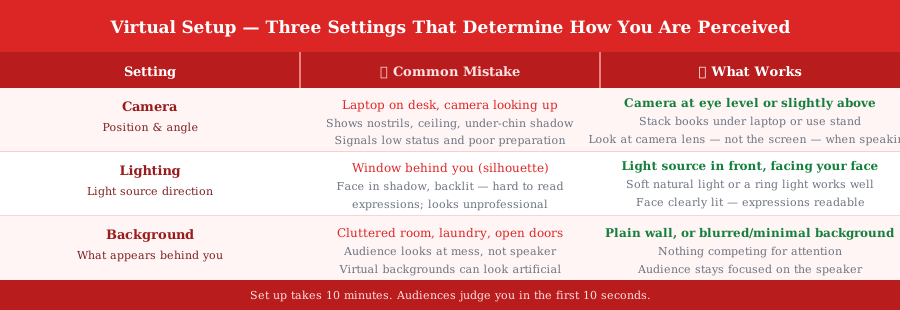
💡 Tip: Look at the camera lens when speaking — not at faces on screen. The lens is the audience. Looking at the screen gives everyone the impression you are looking slightly to the side, not at them.
🎯
Worked Example: Virtual Opening Delivery
Topic: 'Why most professionals will never use AI effectively.' Here is how the opening lands in a well-set-up virtual environment.
Setup: camera at eye level, light from front, plain background — opening delivery: [Camera at eye level. Ring light facing speaker. Plain white wall behind.]
[Speaker looks directly at camera lens — not at the participant grid.]
"I want to start by asking you something."
[Pause. Hold eye contact with the lens.]
"Think about the last time you used AI for something at work. How long did it take you to get a result you were actually happy with?"
[Let the question land. Slight pause.]
"Most people I ask say more than five minutes. Some say they gave up. The people who get results in under sixty seconds have one thing in common — and it is not which tool they use."
[Camera eye contact throughout. No glancing at notes. No looking at screen.]
"That is what today is about."
🔊
The One Rule for Virtual Engagement
Virtual audience attention spans are shorter than in-person. One rule prevents most disengagement.
- ✓Add 20% more vocal energy than feels natural — Camera compresses expressiveness — what feels like 'a bit much' in person reads as normal and engaged on screen
- ✓Check in every 5–7 minutes with a direct question or poll — Passive watching is the default for virtual audiences — interrupt it by name: 'Priya, does that match what you have seen?'
- ✓Audio quality matters more than video quality — Audiences forgive a slightly blurry image; they will not tolerate distorted or echoing audio for an hour — use an external mic
Key Takeaways
- 1Camera at eye level or slightly above — never laptop-on-desk looking up at the audience
- 2Light source must face you — a window behind you creates a silhouette
- 3Look at the camera lens for eye contact, not at faces on screen
- 4Audio quality matters more than video quality — an external mic makes the single biggest difference
- 5Add 20% more vocal energy than feels natural — the camera compresses your expressiveness
What's Next
Continue through the course in order, or jump back to review earlier lessons.