Designing Effective Slides
Your slides are a visual companion to your voice — not a script. When a slide tries to say everything, the speaker becomes unnecessary. One idea per slide, shown simply, is the entire principle.
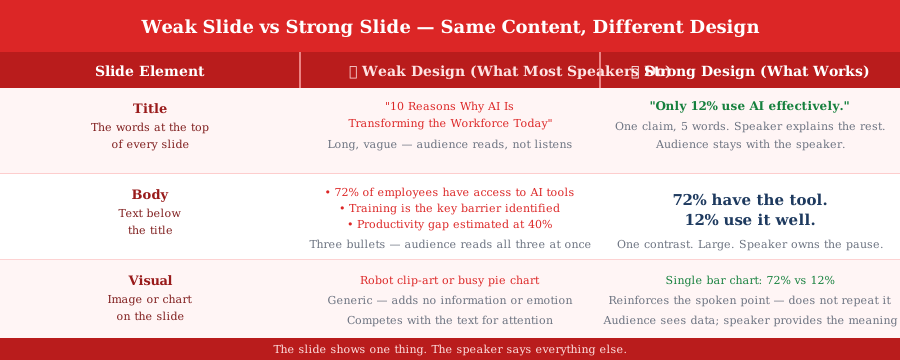
Weak Slide vs Strong Slide — Same Content, Different Design
The diagram compares weak and strong slide design across three elements — title, body, and visual — using this example as the content. The weak version puts everything on the slide; the strong version puts one thing on the slide and lets the speaker say the rest.
Worked Example: One Slide, Two Versions
Topic: 'Why most professionals will never use AI effectively.' Two versions of the same opening slide — same data, completely different effect.
The One Question to Ask Every Slide
Before moving on from any slide, ask one question. The answer tells you whether the design is right.
- ✓"What is the single thing this slide needs the audience to remember?" — If you cannot answer in one sentence, the slide is trying to do too much — split it or cut it
- ✓If the audience can read the slide without you, rewrite it — The slide shows the one thing; the speaker provides context, nuance, story, and meaning
- ✓Maximum 6 words in the title, no full sentences in the body — If a point needs a full sentence, it belongs in a spoken line — not on the slide
Key Takeaways
- 1One idea per slide — when the idea changes, the slide changes
- 2The slide shows the one thing; the speaker says everything else
- 3A weak slide makes the speaker redundant; a strong slide makes the speaker essential
- 4Ask: 'What is the single thing this slide must make the audience remember?' If you can't answer in one sentence, split the slide
- 5Maximum 6 words in the title; no full sentences in the body; minimum 24pt font
What's Next
Continue through the course in order, or jump back to review earlier lessons.